Handling Multi-service DB Initialization with h2-oracle-test
Background
Services commonly require initialization of a database for successful operation. This includes creating the DB schemas themselves as well as any test data required or desired for deploying the application and executing automated tests.
Many times, these services require other services that require their own data initialization against the same database instance.
Currently, this is handled by each service providing their own DB initialization scripts within a Maven module, and published
as a JAR to the Maven repository. When another service requires this service to be deployed along with its associated test
data, the service’s Maven build extracts the dependent service data JAR and copies to the h2-oracle-test Helm subchart
volumes directory so that when the chart is installed to the Kubernetes cluster, the dependent service’s DB initialization
scripts are executed in the h2-oracle-test application (along with its own scripts, if needed).
pom.xml snippet that sets up dependency (eula-service) DB data<plugin>
<groupId>org.apache.maven.plugins</groupId>
<artifactId>maven-dependency-plugin</artifactId>
<executions>
<execution>
<id>unpack-dependency-scripts</id>
<goals>
<goal>unpack</goal>
</goals>
<phase>prepare-package</phase>
<configuration>
<artifactItems>
<artifactItem>
<groupId>gov.va.mobile.lib</groupId>
<artifactId>eula-service-db</artifactId>
<version>${eula-service-db.version}</version>
<type>jar</type>
</artifactItem>
</artifactItems>
<includes>db/sql/h2/*.sql</includes>
<outputDirectory>${project.build.directory}</outputDirectory>
</configuration>
</execution>
</executions>
</plugin>
<plugin>
<artifactId>maven-resources-plugin</artifactId>
<executions>
<execution>
<id>copy-db-scripts</id>
<goals>
<goal>copy-resources</goal>
</goals>
<phase>package</phase>
<configuration>
<resources>
<resource>
<directory>${project.build.directory}/db/sql/h2</directory>
<includes>**/*.sql</includes>
</resource>
</resources>
<outputDirectory>${project.build.directory}/helm/ssoe-sts-${project.version}/charts/h2-oracle-test-${h2oracletest.version}/volumes/db</outputDirectory>
<overwrite>true</overwrite>
</configuration>
</execution>
</executions>
</plugin>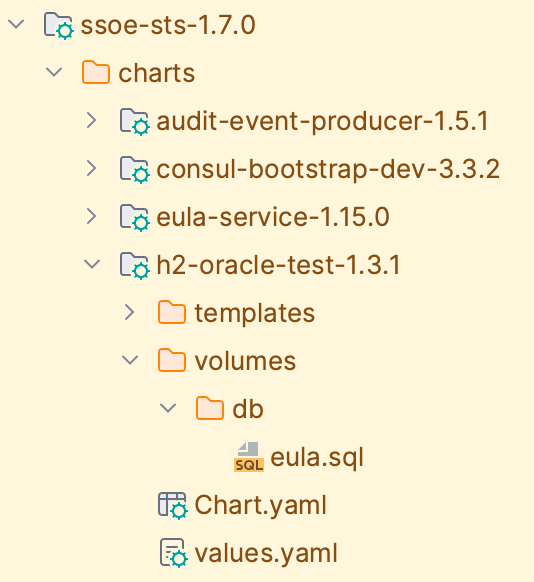
helm build directory for ssoe-stsWith the transition from Helm to Kustomize-based Kubernetes resource definition, this mechanism needs to be updated to account for how Kubernetes manifests are now defined and managed.
Improving Ease of Configuration With Kustomize
While a similar model could be implemented with Kustomize-based service configurations, a more straighforward, DRY, and less Maven-centric approach is possible.
With Kustomize, each service dependency’s Kubernetes configuration can be specified as a simple remote Git reference. Our
convention is to define the service’s standalone required configurations (that is, only the Kubernetes configurations needed
for it to be individually deployed) in the dev Kustomize overlay within its project structure. Kustomize introduced the
Component configuration type to allow a more flexible way to define and include independent configurations that don’t fit in the
traditional "top-down" Kustomize overlay approach (i.e, utilizing composition instead of inheritance)
Example: Given the microservices service-a and service-b, their Kubernetes configurations would be defined as a set of
Kustomize configurations within the project’s kubernetes directory. They each define a dev component which
contains the minimum configuration and sample data needed for the service to be independently deployed in a "dev"-oriented
test scenario.
| service-a project structure | service-b project structure |
|---|---|
If service-b also depends on service-a to be deployed for it to operate correctly, both service-a and service-b's
DB initialization scripts need to be executed against the h2-oracle-test database. To properly handle this multi-service
data requirement, each of their initialization scripts (service-a.sql and service-b.sql) need to both be copied into the
h2-oracle-test container. The "copying" is handled implicitly by each service defining a Kubernetes ConfigMap that
is generated (via Kustomize) from these files, along with a Volume that uses this ConfigMap as its source, to be
mounted on h2-oracle-test's file system in a subdirectory of the /data/db directory.
When the h2-oracle-db container starts up, it iterates through each subdirectory in /data/db and executes all SQL
scripts it finds, loading the DB data contained in service-a and service-b's own Kustomizations.